|
|
| (28 intermediate revisions by the same user not shown) |
| Line 1: |
Line 1: |
| <p style="border: 0px solid rgb(227, 227, 227); box-sizing: border-box; --tw-border-spacing-x: 0; --tw-border-spacing-y: 0; --tw-translate-x: 0; --tw-translate-y: 0; --tw-rotate: 0; --tw-skew-x: 0; --tw-skew-y: 0; --tw-scale-x: 1; --tw-scale-y: 1; --tw-scroll-snap-strictness: proximity; --tw-ring-offset-width: 0px; --tw-ring-offset-color: #fff; --tw-ring-color: rgba(69,89,164,.5); --tw-ring-offset-shadow: 0 0 transparent; --tw-ring-shadow: 0 0 transparent; --tw-shadow: 0 0 transparent; --tw-shadow-colored: 0 0 transparent; margin: 0px 0px 1.25em; color: rgb(236, 236, 236); font-family: Söhne, ui-sans-serif, system-ui, -apple-system, "Segoe UI", Roboto, Ubuntu, Cantarell, "Noto Sans", sans-serif, "Helvetica Neue", Arial, "Apple Color Emoji", "Segoe UI Emoji", "Segoe UI Symbol", "Noto Color Emoji"; font-size: 16px; font-style: normal; font-variant-ligatures: normal; font-variant-caps: normal; font-weight: 400; letter-spacing: normal; text-align: start; text-indent: 0px; text-transform: none; word-spacing: 0px; -webkit-text-stroke-width: 0px; white-space: pre-wrap; background-color: rgb(33, 33, 33); text-decoration-thickness: initial; text-decoration-style: initial; text-decoration-color: initial; --darkreader-inline-border-top: #383d3f; --darkreader-inline-border-right: #383d3f; --darkreader-inline-border-bottom: #383d3f; --darkreader-inline-border-left: #383d3f; --darkreader-inline-color: #dcd9d4; --darkreader-inline-bgcolor: #191b1c;" data-darkreader-inline-border-top="" data-darkreader-inline-border-right="" data-darkreader-inline-border-bottom="" data-darkreader-inline-border-left="" data-darkreader-inline-color="" data-darkreader-inline-bgcolor=""><strong style="border: 0px solid rgb(227, 227, 227); box-sizing: border-box; --tw-border-spacing-x: 0; --tw-border-spacing-y: 0; --tw-translate-x: 0; --tw-translate-y: 0; --tw-rotate: 0; --tw-skew-x: 0; --tw-skew-y: 0; --tw-scale-x: 1; --tw-scale-y: 1; --tw-scroll-snap-strictness: proximity; --tw-ring-offset-width: 0px; --tw-ring-offset-color: #fff; --tw-ring-color: rgba(69,89,164,.5); --tw-ring-offset-shadow: 0 0 transparent; --tw-ring-shadow: 0 0 transparent; --tw-shadow: 0 0 transparent; --tw-shadow-colored: 0 0 transparent; font-weight: 600; color: var(--tw-prose-bold); --darkreader-inline-border-top: #383d3f; --darkreader-inline-border-right: #383d3f; --darkreader-inline-border-bottom: #383d3f; --darkreader-inline-border-left: #383d3f; --darkreader-inline-color: var(--darkreader-text--tw-prose-bold);" data-darkreader-inline-border-top="" data-darkreader-inline-border-right="" data-darkreader-inline-border-bottom="" data-darkreader-inline-border-left="" data-darkreader-inline-color="">How to Take a Screenshot or Snippet and Send It via Email or Slack</strong></p><p style="border: 0px solid rgb(227, 227, 227); box-sizing: border-box; --tw-border-spacing-x: 0; --tw-border-spacing-y: 0; --tw-translate-x: 0; --tw-translate-y: 0; --tw-rotate: 0; --tw-skew-x: 0; --tw-skew-y: 0; --tw-scale-x: 1; --tw-scale-y: 1; --tw-scroll-snap-strictness: proximity; --tw-ring-offset-width: 0px; --tw-ring-offset-color: #fff; --tw-ring-color: rgba(69,89,164,.5); --tw-ring-offset-shadow: 0 0 transparent; --tw-ring-shadow: 0 0 transparent; --tw-shadow: 0 0 transparent; --tw-shadow-colored: 0 0 transparent; margin: 1.25em 0px; color: rgb(236, 236, 236); font-family: Söhne, ui-sans-serif, system-ui, -apple-system, "Segoe UI", Roboto, Ubuntu, Cantarell, "Noto Sans", sans-serif, "Helvetica Neue", Arial, "Apple Color Emoji", "Segoe UI Emoji", "Segoe UI Symbol", "Noto Color Emoji"; font-size: 16px; font-style: normal; font-variant-ligatures: normal; font-variant-caps: normal; font-weight: 400; letter-spacing: normal; text-align: start; text-indent: 0px; text-transform: none; word-spacing: 0px; -webkit-text-stroke-width: 0px; white-space: pre-wrap; background-color: rgb(33, 33, 33); text-decoration-thickness: initial; text-decoration-style: initial; text-decoration-color: initial; --darkreader-inline-border-top: #383d3f; --darkreader-inline-border-right: #383d3f; --darkreader-inline-border-bottom: #383d3f; --darkreader-inline-border-left: #383d3f; --darkreader-inline-color: #dcd9d4; --darkreader-inline-bgcolor: #191b1c;" data-darkreader-inline-border-top="" data-darkreader-inline-border-right="" data-darkreader-inline-border-bottom="" data-darkreader-inline-border-left="" data-darkreader-inline-color="" data-darkreader-inline-bgcolor=""><strong style="border: 0px solid rgb(227, 227, 227); box-sizing: border-box; --tw-border-spacing-x: 0; --tw-border-spacing-y: 0; --tw-translate-x: 0; --tw-translate-y: 0; --tw-rotate: 0; --tw-skew-x: 0; --tw-skew-y: 0; --tw-scale-x: 1; --tw-scale-y: 1; --tw-scroll-snap-strictness: proximity; --tw-ring-offset-width: 0px; --tw-ring-offset-color: #fff; --tw-ring-color: rgba(69,89,164,.5); --tw-ring-offset-shadow: 0 0 transparent; --tw-ring-shadow: 0 0 transparent; --tw-shadow: 0 0 transparent; --tw-shadow-colored: 0 0 transparent; font-weight: 600; color: var(--tw-prose-bold); --darkreader-inline-border-top: #383d3f; --darkreader-inline-border-right: #383d3f; --darkreader-inline-border-bottom: #383d3f; --darkreader-inline-border-left: #383d3f; --darkreader-inline-color: var(--darkreader-text--tw-prose-bold);" data-darkreader-inline-border-top="" data-darkreader-inline-border-right="" data-darkreader-inline-border-bottom="" data-darkreader-inline-border-left="" data-darkreader-inline-color="">What is a Screenshot or Snippet?</strong> A screenshot captures the entire visible screen, while a snippet lets you select a specific area of your screen to capture. This is useful for sharing visual information quickly.</p><p style="border: 0px solid rgb(227, 227, 227); box-sizing: border-box; --tw-border-spacing-x: 0; --tw-border-spacing-y: 0; --tw-translate-x: 0; --tw-translate-y: 0; --tw-rotate: 0; --tw-skew-x: 0; --tw-skew-y: 0; --tw-scale-x: 1; --tw-scale-y: 1; --tw-scroll-snap-strictness: proximity; --tw-ring-offset-width: 0px; --tw-ring-offset-color: #fff; --tw-ring-color: rgba(69,89,164,.5); --tw-ring-offset-shadow: 0 0 transparent; --tw-ring-shadow: 0 0 transparent; --tw-shadow: 0 0 transparent; --tw-shadow-colored: 0 0 transparent; margin: 1.25em 0px; color: rgb(236, 236, 236); font-family: Söhne, ui-sans-serif, system-ui, -apple-system, "Segoe UI", Roboto, Ubuntu, Cantarell, "Noto Sans", sans-serif, "Helvetica Neue", Arial, "Apple Color Emoji", "Segoe UI Emoji", "Segoe UI Symbol", "Noto Color Emoji"; font-size: 16px; font-style: normal; font-variant-ligatures: normal; font-variant-caps: normal; font-weight: 400; letter-spacing: normal; text-align: start; text-indent: 0px; text-transform: none; word-spacing: 0px; -webkit-text-stroke-width: 0px; white-space: pre-wrap; background-color: rgb(33, 33, 33); text-decoration-thickness: initial; text-decoration-style: initial; text-decoration-color: initial; --darkreader-inline-border-top: #383d3f; --darkreader-inline-border-right: #383d3f; --darkreader-inline-border-bottom: #383d3f; --darkreader-inline-border-left: #383d3f; --darkreader-inline-color: #dcd9d4; --darkreader-inline-bgcolor: #191b1c;" data-darkreader-inline-border-top="" data-darkreader-inline-border-right="" data-darkreader-inline-border-bottom="" data-darkreader-inline-border-left="" data-darkreader-inline-color="" data-darkreader-inline-bgcolor=""><strong style="border: 0px solid rgb(227, 227, 227); box-sizing: border-box; --tw-border-spacing-x: 0; --tw-border-spacing-y: 0; --tw-translate-x: 0; --tw-translate-y: 0; --tw-rotate: 0; --tw-skew-x: 0; --tw-skew-y: 0; --tw-scale-x: 1; --tw-scale-y: 1; --tw-scroll-snap-strictness: proximity; --tw-ring-offset-width: 0px; --tw-ring-offset-color: #fff; --tw-ring-color: rgba(69,89,164,.5); --tw-ring-offset-shadow: 0 0 transparent; --tw-ring-shadow: 0 0 transparent; --tw-shadow: 0 0 transparent; --tw-shadow-colored: 0 0 transparent; font-weight: 600; color: var(--tw-prose-bold); --darkreader-inline-border-top: #383d3f; --darkreader-inline-border-right: #383d3f; --darkreader-inline-border-bottom: #383d3f; --darkreader-inline-border-left: #383d3f; --darkreader-inline-color: var(--darkreader-text--tw-prose-bold);" data-darkreader-inline-border-top="" data-darkreader-inline-border-right="" data-darkreader-inline-border-bottom="" data-darkreader-inline-border-left="" data-darkreader-inline-color="">Step 1: Open Snipping Tool or Snip & Sketch</strong></p> | | |
| *<strong style="border: 0px solid rgb(227, 227, 227); box-sizing: border-box; --tw-border-spacing-x: 0; --tw-border-spacing-y: 0; --tw-translate-x: 0; --tw-translate-y: 0; --tw-rotate: 0; --tw-skew-x: 0; --tw-skew-y: 0; --tw-scale-x: 1; --tw-scale-y: 1; --tw-scroll-snap-strictness: proximity; --tw-ring-offset-width: 0px; --tw-ring-offset-color: #fff; --tw-ring-color: rgba(69,89,164,.5); --tw-ring-offset-shadow: 0 0 transparent; --tw-ring-shadow: 0 0 transparent; --tw-shadow: 0 0 transparent; --tw-shadow-colored: 0 0 transparent; font-weight: 600; color: var(--tw-prose-bold); margin-top: 1.25em; margin-bottom: 1.25em; --darkreader-inline-border-top: #383d3f; --darkreader-inline-border-right: #383d3f; --darkreader-inline-border-bottom: #383d3f; --darkreader-inline-border-left: #383d3f; --darkreader-inline-color: var(--darkreader-text--tw-prose-bold);" data-darkreader-inline-border-top="" data-darkreader-inline-border-right="" data-darkreader-inline-border-bottom="" data-darkreader-inline-border-left="" data-darkreader-inline-color="">Find the application in the Start menu.</strong> | | |
| *Click on the Start menu icon at the bottom left of your screen. Scroll through the alphabetical list of apps to find "Snipping Tool" or "Snip & Sketch". If you see it, click on it to open. If you don't find the application in the list, | | <span style="color: rgb(255, 0, 0); --darkreader-inline-color: #ff1a1a;" data-darkreader-inline-color="">'''<span style="font-size: 18pt;">Important Note:</span>'''</span> |
| *<strong style="border: 0px solid rgb(227, 227, 227); box-sizing: border-box; --tw-border-spacing-x: 0; --tw-border-spacing-y: 0; --tw-translate-x: 0; --tw-translate-y: 0; --tw-rotate: 0; --tw-skew-x: 0; --tw-skew-y: 0; --tw-scale-x: 1; --tw-scale-y: 1; --tw-scroll-snap-strictness: proximity; --tw-ring-offset-width: 0px; --tw-ring-offset-color: #fff; --tw-ring-color: rgba(69,89,164,.5); --tw-ring-offset-shadow: 0 0 transparent; --tw-ring-shadow: 0 0 transparent; --tw-shadow: 0 0 transparent; --tw-shadow-colored: 0 0 transparent; font-weight: 600; color: var(--tw-prose-bold); margin-top: 1.25em; margin-bottom: 1.25em; --darkreader-inline-border-top: #383d3f; --darkreader-inline-border-right: #383d3f; --darkreader-inline-border-bottom: #383d3f; --darkreader-inline-border-left: #383d3f; --darkreader-inline-color: var(--darkreader-text--tw-prose-bold);" data-darkreader-inline-border-top="" data-darkreader-inline-border-right="" data-darkreader-inline-border-bottom="" data-darkreader-inline-border-left="" data-darkreader-inline-color="">Search for the application.</strong> | | |
| *Click on the Start menu icon again and type "Snipping Tool" or "Snip & Sketch" into the search bar at the bottom. When the application appears in the search results, click on it to open. | | <span style="color: rgb(255, 0, 0); --darkreader-inline-color: #ff1a1a;" data-darkreader-inline-color="">'''''Please use Snip & Sketch only for capturing information that cannot be easily copied and pasted, such as images or complex layouts. Avoid taking screenshots of text that can be copied and pasted directly, as this requires others to retype the information, which is inefficient and potentially error-prone.'''''</span> |
| | |
| | <span style="color: rgb(224, 62, 45); --darkreader-inline-color: #e34f40;" data-darkreader-inline-color="">'' ''</span> |
| | |
| | '''[[Copy and Paste|Click here for instructions on how to Copy and Paste text.]]''' |
| | |
| | <span style="color: rgb(224, 62, 45); --darkreader-inline-color: #e34f40;" data-darkreader-inline-color="">'' ''</span> |
| | ----<span style="color: rgb(224, 62, 45); --darkreader-inline-color: #e34f40;" data-darkreader-inline-color="">'' ''</span> |
| | |
| | '''What is a Screenshot or Snippet?'''A screenshot captures the entire visible screen, while a snippet allows you to select a specific area of your screen to capture. This is useful for documenting and sharing visual information quickly. |
| | |
| | |
| | |
| | '''Step 1: Open Snip & Sketch''' |
| | * '''Find the application in the Start Menu.''' |
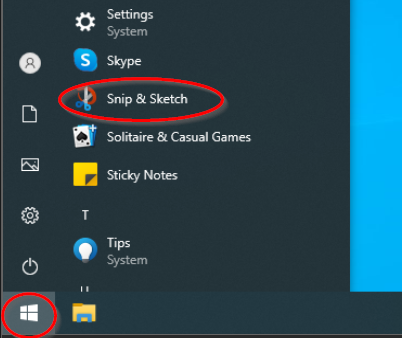
| | ** Click on the Start menu icon at the bottom left of your screen. Scroll through the alphabetical list of apps to find "Snip & Sketch". If you see it, click on it to open.<br> <br>[[File:Start snip and sketch.png]]<br> |
| | ** If the application is not visible in the list, search for it: |
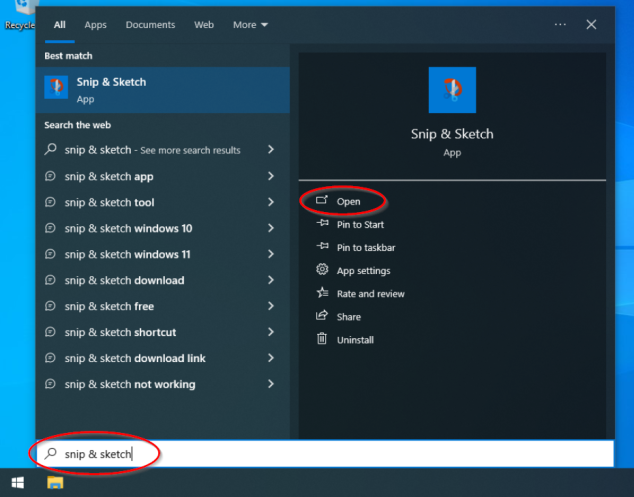
| | *** Click on the Start menu icon again and type "Snip & Sketch." The start menu will automatically change into a search box. Click on the application when it appears in the search results, then click on "Open" when the application properties show. <br> <br>[[File:Search snip sketch.png|634x634px]] |
| | |
|
| |
|
| '''Step 2: Choose the Type of Snip''' | | '''Step 2: Choose the Type of Snip''' |
| * '''Select snip type.''' | | |
| * In the Snipping Tool or Snip & Sketch, click 'New'. You will then choose from several different types of snips: | | * '''Select the type of snip you need.''' |
| ** '''Free-form Snip''': Allows you to draw an irregular shape around an area to capture it. This type is useful for capturing a specific part of the screen that does not conform to standard shapes.
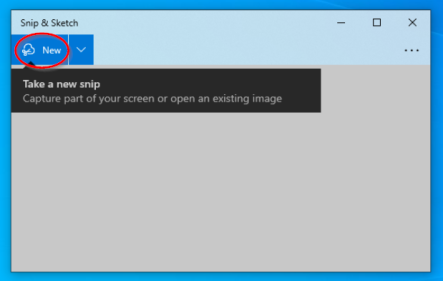
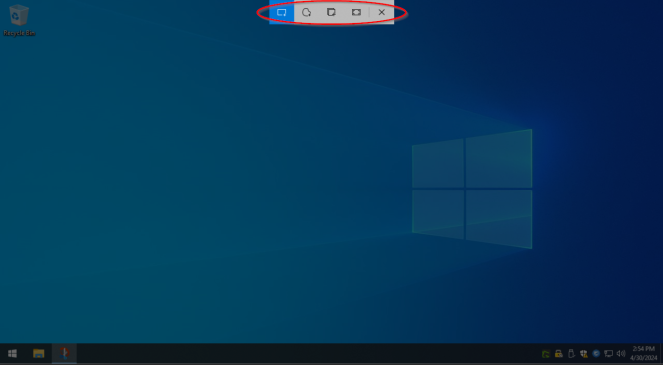
| | ** Click 'New' in the application. <br> <br>[[File:New snip button.png|443x443px]]<br> <br>Choose from the following types of snips: |
| ** '''Rectangular Snip''': Lets you draw a rectangle with your cursor to capture a specific area. It’s ideal for capturing menu options, toolbars, or any other content that aligns well within a rectangular shape. | | *** '''Free-form Snip:''' Draw an irregular shape around an area to capture. |
| ** '''Window Snip''': This option lets you select a specific window you have open, such as a browser window or a dialog box, and captures only that window. It’s perfect when you need to capture just one window without any other parts of your screen. | | *** '''Rectangular Snip:''' Draw a rectangle with your cursor to capture a specific area. |
| ** '''Full-screen Snip''': Captures everything visible on your screen. This is particularly useful for capturing the full display of your setup, such as your entire desktop or a full application window. | | *** '''Window Snip:''' Select a specific window to capture only that window. |
| * Use your mouse to select the area of the screen you want to capture or click on the window you wish to capture based on the selected type.
| | *** '''Full-screen Snip:''' Capture the entire screen. <br> <br>[[File:Image snip type.png|663x663px]] |
| <p style="border: 0px solid rgb(227, 227, 227); box-sizing: border-box; --tw-border-spacing-x: 0; --tw-border-spacing-y: 0; --tw-translate-x: 0; --tw-translate-y: 0; --tw-rotate: 0; --tw-skew-x: 0; --tw-skew-y: 0; --tw-scale-x: 1; --tw-scale-y: 1; --tw-scroll-snap-strictness: proximity; --tw-ring-offset-width: 0px; --tw-ring-offset-color: #fff; --tw-ring-color: rgba(69,89,164,.5); --tw-ring-offset-shadow: 0 0 transparent; --tw-ring-shadow: 0 0 transparent; --tw-shadow: 0 0 transparent; --tw-shadow-colored: 0 0 transparent; margin: 1.25em 0px; color: rgb(236, 236, 236); font-family: Söhne, ui-sans-serif, system-ui, -apple-system, "Segoe UI", Roboto, Ubuntu, Cantarell, "Noto Sans", sans-serif, "Helvetica Neue", Arial, "Apple Color Emoji", "Segoe UI Emoji", "Segoe UI Symbol", "Noto Color Emoji"; font-size: 16px; font-style: normal; font-variant-ligatures: normal; font-variant-caps: normal; font-weight: 400; letter-spacing: normal; text-align: start; text-indent: 0px; text-transform: none; word-spacing: 0px; -webkit-text-stroke-width: 0px; white-space: pre-wrap; background-color: rgb(33, 33, 33); text-decoration-thickness: initial; text-decoration-style: initial; text-decoration-color: initial; --darkreader-inline-border-top: #383d3f; --darkreader-inline-border-right: #383d3f; --darkreader-inline-border-bottom: #383d3f; --darkreader-inline-border-left: #383d3f; --darkreader-inline-color: #dcd9d4; --darkreader-inline-bgcolor: #191b1c;" data-darkreader-inline-border-top="" data-darkreader-inline-border-right="" data-darkreader-inline-border-bottom="" data-darkreader-inline-border-left="" data-darkreader-inline-color="" data-darkreader-inline-bgcolor=""><strong style="border: 0px solid rgb(227, 227, 227); box-sizing: border-box; --tw-border-spacing-x: 0; --tw-border-spacing-y: 0; --tw-translate-x: 0; --tw-translate-y: 0; --tw-rotate: 0; --tw-skew-x: 0; --tw-skew-y: 0; --tw-scale-x: 1; --tw-scale-y: 1; --tw-scroll-snap-strictness: proximity; --tw-ring-offset-width: 0px; --tw-ring-offset-color: #fff; --tw-ring-color: rgba(69,89,164,.5); --tw-ring-offset-shadow: 0 0 transparent; --tw-ring-shadow: 0 0 transparent; --tw-shadow: 0 0 transparent; --tw-shadow-colored: 0 0 transparent; font-weight: 600; color: var(--tw-prose-bold); --darkreader-inline-border-top: #383d3f; --darkreader-inline-border-right: #383d3f; --darkreader-inline-border-bottom: #383d3f; --darkreader-inline-border-left: #383d3f; --darkreader-inline-color: var(--darkreader-text--tw-prose-bold);" data-darkreader-inline-border-top="" data-darkreader-inline-border-right="" data-darkreader-inline-border-bottom="" data-darkreader-inline-border-left="" data-darkreader-inline-color="">Step 3: Capture the Screenshot or Snippet</strong></p> | | |
| *<strong style="border: 0px solid rgb(227, 227, 227); box-sizing: border-box; --tw-border-spacing-x: 0; --tw-border-spacing-y: 0; --tw-translate-x: 0; --tw-translate-y: 0; --tw-rotate: 0; --tw-skew-x: 0; --tw-skew-y: 0; --tw-scale-x: 1; --tw-scale-y: 1; --tw-scroll-snap-strictness: proximity; --tw-ring-offset-width: 0px; --tw-ring-offset-color: #fff; --tw-ring-color: rgba(69,89,164,.5); --tw-ring-offset-shadow: 0 0 transparent; --tw-ring-shadow: 0 0 transparent; --tw-shadow: 0 0 transparent; --tw-shadow-colored: 0 0 transparent; font-weight: 600; color: var(--tw-prose-bold); margin-top: 1.25em; margin-bottom: 1.25em; --darkreader-inline-border-top: #383d3f; --darkreader-inline-border-right: #383d3f; --darkreader-inline-border-bottom: #383d3f; --darkreader-inline-border-left: #383d3f; --darkreader-inline-color: var(--darkreader-text--tw-prose-bold);" data-darkreader-inline-border-top="" data-darkreader-inline-border-right="" data-darkreader-inline-border-bottom="" data-darkreader-inline-border-left="" data-darkreader-inline-color="">Take the snip.</strong>
| | |
| *Use your mouse to select the area of the screen you want to capture.
| | '''Step 3: Capture the Screenshot or Snippet''' |
| <p style="border: 0px solid rgb(227, 227, 227); box-sizing: border-box; --tw-border-spacing-x: 0; --tw-border-spacing-y: 0; --tw-translate-x: 0; --tw-translate-y: 0; --tw-rotate: 0; --tw-skew-x: 0; --tw-skew-y: 0; --tw-scale-x: 1; --tw-scale-y: 1; --tw-scroll-snap-strictness: proximity; --tw-ring-offset-width: 0px; --tw-ring-offset-color: #fff; --tw-ring-color: rgba(69,89,164,.5); --tw-ring-offset-shadow: 0 0 transparent; --tw-ring-shadow: 0 0 transparent; --tw-shadow: 0 0 transparent; --tw-shadow-colored: 0 0 transparent; margin: 1.25em 0px; color: rgb(236, 236, 236); font-family: Söhne, ui-sans-serif, system-ui, -apple-system, "Segoe UI", Roboto, Ubuntu, Cantarell, "Noto Sans", sans-serif, "Helvetica Neue", Arial, "Apple Color Emoji", "Segoe UI Emoji", "Segoe UI Symbol", "Noto Color Emoji"; font-size: 16px; font-style: normal; font-variant-ligatures: normal; font-variant-caps: normal; font-weight: 400; letter-spacing: normal; text-align: start; text-indent: 0px; text-transform: none; word-spacing: 0px; -webkit-text-stroke-width: 0px; white-space: pre-wrap; background-color: rgb(33, 33, 33); text-decoration-thickness: initial; text-decoration-style: initial; text-decoration-color: initial; --darkreader-inline-border-top: #383d3f; --darkreader-inline-border-right: #383d3f; --darkreader-inline-border-bottom: #383d3f; --darkreader-inline-border-left: #383d3f; --darkreader-inline-color: #dcd9d4; --darkreader-inline-bgcolor: #191b1c;" data-darkreader-inline-border-top="" data-darkreader-inline-border-right="" data-darkreader-inline-border-bottom="" data-darkreader-inline-border-left="" data-darkreader-inline-color="" data-darkreader-inline-bgcolor=""><strong style="border: 0px solid rgb(227, 227, 227); box-sizing: border-box; --tw-border-spacing-x: 0; --tw-border-spacing-y: 0; --tw-translate-x: 0; --tw-translate-y: 0; --tw-rotate: 0; --tw-skew-x: 0; --tw-skew-y: 0; --tw-scale-x: 1; --tw-scale-y: 1; --tw-scroll-snap-strictness: proximity; --tw-ring-offset-width: 0px; --tw-ring-offset-color: #fff; --tw-ring-color: rgba(69,89,164,.5); --tw-ring-offset-shadow: 0 0 transparent; --tw-ring-shadow: 0 0 transparent; --tw-shadow: 0 0 transparent; --tw-shadow-colored: 0 0 transparent; font-weight: 600; color: var(--tw-prose-bold); --darkreader-inline-border-top: #383d3f; --darkreader-inline-border-right: #383d3f; --darkreader-inline-border-bottom: #383d3f; --darkreader-inline-border-left: #383d3f; --darkreader-inline-color: var(--darkreader-text--tw-prose-bold);" data-darkreader-inline-border-top="" data-darkreader-inline-border-right="" data-darkreader-inline-border-bottom="" data-darkreader-inline-border-left="" data-darkreader-inline-color="">Step 4: Save the Screenshot or Snippet</strong></p>
| | |
| *<strong style="border: 0px solid rgb(227, 227, 227); box-sizing: border-box; --tw-border-spacing-x: 0; --tw-border-spacing-y: 0; --tw-translate-x: 0; --tw-translate-y: 0; --tw-rotate: 0; --tw-skew-x: 0; --tw-skew-y: 0; --tw-scale-x: 1; --tw-scale-y: 1; --tw-scroll-snap-strictness: proximity; --tw-ring-offset-width: 0px; --tw-ring-offset-color: #fff; --tw-ring-color: rgba(69,89,164,.5); --tw-ring-offset-shadow: 0 0 transparent; --tw-ring-shadow: 0 0 transparent; --tw-shadow: 0 0 transparent; --tw-shadow-colored: 0 0 transparent; font-weight: 600; color: var(--tw-prose-bold); margin-top: 1.25em; margin-bottom: 1.25em; --darkreader-inline-border-top: #383d3f; --darkreader-inline-border-right: #383d3f; --darkreader-inline-border-bottom: #383d3f; --darkreader-inline-border-left: #383d3f; --darkreader-inline-color: var(--darkreader-text--tw-prose-bold);" data-darkreader-inline-border-top="" data-darkreader-inline-border-right="" data-darkreader-inline-border-bottom="" data-darkreader-inline-border-left="" data-darkreader-inline-color="">Save the file.</strong>
| | * '''Take the snip.''' |
| *Click the Save icon, choose a location and filename, and save the file in a format like JPEG or PNG.
| | ** For a free-form or rectangular snip, click and hold the left mouse button, then draw around the area you want to capture. Release the mouse button to capture the selected area. |
| <p style="border: 0px solid rgb(227, 227, 227); box-sizing: border-box; --tw-border-spacing-x: 0; --tw-border-spacing-y: 0; --tw-translate-x: 0; --tw-translate-y: 0; --tw-rotate: 0; --tw-skew-x: 0; --tw-skew-y: 0; --tw-scale-x: 1; --tw-scale-y: 1; --tw-scroll-snap-strictness: proximity; --tw-ring-offset-width: 0px; --tw-ring-offset-color: #fff; --tw-ring-color: rgba(69,89,164,.5); --tw-ring-offset-shadow: 0 0 transparent; --tw-ring-shadow: 0 0 transparent; --tw-shadow: 0 0 transparent; --tw-shadow-colored: 0 0 transparent; margin: 1.25em 0px; color: rgb(236, 236, 236); font-family: Söhne, ui-sans-serif, system-ui, -apple-system, "Segoe UI", Roboto, Ubuntu, Cantarell, "Noto Sans", sans-serif, "Helvetica Neue", Arial, "Apple Color Emoji", "Segoe UI Emoji", "Segoe UI Symbol", "Noto Color Emoji"; font-size: 16px; font-style: normal; font-variant-ligatures: normal; font-variant-caps: normal; font-weight: 400; letter-spacing: normal; text-align: start; text-indent: 0px; text-transform: none; word-spacing: 0px; -webkit-text-stroke-width: 0px; white-space: pre-wrap; background-color: rgb(33, 33, 33); text-decoration-thickness: initial; text-decoration-style: initial; text-decoration-color: initial; --darkreader-inline-border-top: #383d3f; --darkreader-inline-border-right: #383d3f; --darkreader-inline-border-bottom: #383d3f; --darkreader-inline-border-left: #383d3f; --darkreader-inline-color: #dcd9d4; --darkreader-inline-bgcolor: #191b1c;" data-darkreader-inline-border-top="" data-darkreader-inline-border-right="" data-darkreader-inline-border-bottom="" data-darkreader-inline-border-left="" data-darkreader-inline-color="" data-darkreader-inline-bgcolor=""><strong style="border: 0px solid rgb(227, 227, 227); box-sizing: border-box; --tw-border-spacing-x: 0; --tw-border-spacing-y: 0; --tw-translate-x: 0; --tw-translate-y: 0; --tw-rotate: 0; --tw-skew-x: 0; --tw-skew-y: 0; --tw-scale-x: 1; --tw-scale-y: 1; --tw-scroll-snap-strictness: proximity; --tw-ring-offset-width: 0px; --tw-ring-offset-color: #fff; --tw-ring-color: rgba(69,89,164,.5); --tw-ring-offset-shadow: 0 0 transparent; --tw-ring-shadow: 0 0 transparent; --tw-shadow: 0 0 transparent; --tw-shadow-colored: 0 0 transparent; font-weight: 600; color: var(--tw-prose-bold); --darkreader-inline-border-top: #383d3f; --darkreader-inline-border-right: #383d3f; --darkreader-inline-border-bottom: #383d3f; --darkreader-inline-border-left: #383d3f; --darkreader-inline-color: var(--darkreader-text--tw-prose-bold);" data-darkreader-inline-border-top="" data-darkreader-inline-border-right="" data-darkreader-inline-border-bottom="" data-darkreader-inline-border-left="" data-darkreader-inline-color="">Step 5: Send via Email or Slack</strong></p>
| | ** For a window snip, click the window you want to capture. |
| *<strong style="border: 0px solid rgb(227, 227, 227); box-sizing: border-box; --tw-border-spacing-x: 0; --tw-border-spacing-y: 0; --tw-translate-x: 0; --tw-translate-y: 0; --tw-rotate: 0; --tw-skew-x: 0; --tw-skew-y: 0; --tw-scale-x: 1; --tw-scale-y: 1; --tw-scroll-snap-strictness: proximity; --tw-ring-offset-width: 0px; --tw-ring-offset-color: #fff; --tw-ring-color: rgba(69,89,164,.5); --tw-ring-offset-shadow: 0 0 transparent; --tw-ring-shadow: 0 0 transparent; --tw-shadow: 0 0 transparent; --tw-shadow-colored: 0 0 transparent; font-weight: 600; color: var(--tw-prose-bold); margin-top: 1.25em; margin-bottom: 1.25em; --darkreader-inline-border-top: #383d3f; --darkreader-inline-border-right: #383d3f; --darkreader-inline-border-bottom: #383d3f; --darkreader-inline-border-left: #383d3f; --darkreader-inline-color: var(--darkreader-text--tw-prose-bold);" data-darkreader-inline-border-top="" data-darkreader-inline-border-right="" data-darkreader-inline-border-bottom="" data-darkreader-inline-border-left="" data-darkreader-inline-color="">Choose your sending method.</strong>
| | ** For a full-screen snip, the screen will be captured automatically when you click 'New'. |
| *To send the screenshot or snippet via email, follow steps 6 to 7. To send through Slack, skip to step 8.
| | |
| <p style="border: 0px solid rgb(227, 227, 227); box-sizing: border-box; --tw-border-spacing-x: 0; --tw-border-spacing-y: 0; --tw-translate-x: 0; --tw-translate-y: 0; --tw-rotate: 0; --tw-skew-x: 0; --tw-skew-y: 0; --tw-scale-x: 1; --tw-scale-y: 1; --tw-scroll-snap-strictness: proximity; --tw-ring-offset-width: 0px; --tw-ring-offset-color: #fff; --tw-ring-color: rgba(69,89,164,.5); --tw-ring-offset-shadow: 0 0 transparent; --tw-ring-shadow: 0 0 transparent; --tw-shadow: 0 0 transparent; --tw-shadow-colored: 0 0 transparent; margin: 1.25em 0px; color: rgb(236, 236, 236); font-family: Söhne, ui-sans-serif, system-ui, -apple-system, "Segoe UI", Roboto, Ubuntu, Cantarell, "Noto Sans", sans-serif, "Helvetica Neue", Arial, "Apple Color Emoji", "Segoe UI Emoji", "Segoe UI Symbol", "Noto Color Emoji"; font-size: 16px; font-style: normal; font-variant-ligatures: normal; font-variant-caps: normal; font-weight: 400; letter-spacing: normal; text-align: start; text-indent: 0px; text-transform: none; word-spacing: 0px; -webkit-text-stroke-width: 0px; white-space: pre-wrap; background-color: rgb(33, 33, 33); text-decoration-thickness: initial; text-decoration-style: initial; text-decoration-color: initial; --darkreader-inline-border-top: #383d3f; --darkreader-inline-border-right: #383d3f; --darkreader-inline-border-bottom: #383d3f; --darkreader-inline-border-left: #383d3f; --darkreader-inline-color: #dcd9d4; --darkreader-inline-bgcolor: #191b1c;" data-darkreader-inline-border-top="" data-darkreader-inline-border-right="" data-darkreader-inline-border-bottom="" data-darkreader-inline-border-left="" data-darkreader-inline-color="" data-darkreader-inline-bgcolor=""><strong style="border: 0px solid rgb(227, 227, 227); box-sizing: border-box; --tw-border-spacing-x: 0; --tw-border-spacing-y: 0; --tw-translate-x: 0; --tw-translate-y: 0; --tw-rotate: 0; --tw-skew-x: 0; --tw-skew-y: 0; --tw-scale-x: 1; --tw-scale-y: 1; --tw-scroll-snap-strictness: proximity; --tw-ring-offset-width: 0px; --tw-ring-offset-color: #fff; --tw-ring-color: rgba(69,89,164,.5); --tw-ring-offset-shadow: 0 0 transparent; --tw-ring-shadow: 0 0 transparent; --tw-shadow: 0 0 transparent; --tw-shadow-colored: 0 0 transparent; font-weight: 600; color: var(--tw-prose-bold); --darkreader-inline-border-top: #383d3f; --darkreader-inline-border-right: #383d3f; --darkreader-inline-border-bottom: #383d3f; --darkreader-inline-border-left: #383d3f; --darkreader-inline-color: var(--darkreader-text--tw-prose-bold);" data-darkreader-inline-border-top="" data-darkreader-inline-border-right="" data-darkreader-inline-border-bottom="" data-darkreader-inline-border-left="" data-darkreader-inline-color="">Step 6: Open Your Email Application</strong></p>
| | |
| *<strong style="border: 0px solid rgb(227, 227, 227); box-sizing: border-box; --tw-border-spacing-x: 0; --tw-border-spacing-y: 0; --tw-translate-x: 0; --tw-translate-y: 0; --tw-rotate: 0; --tw-skew-x: 0; --tw-skew-y: 0; --tw-scale-x: 1; --tw-scale-y: 1; --tw-scroll-snap-strictness: proximity; --tw-ring-offset-width: 0px; --tw-ring-offset-color: #fff; --tw-ring-color: rgba(69,89,164,.5); --tw-ring-offset-shadow: 0 0 transparent; --tw-ring-shadow: 0 0 transparent; --tw-shadow: 0 0 transparent; --tw-shadow-colored: 0 0 transparent; font-weight: 600; color: var(--tw-prose-bold); margin-top: 1.25em; margin-bottom: 1.25em; --darkreader-inline-border-top: #383d3f; --darkreader-inline-border-right: #383d3f; --darkreader-inline-border-bottom: #383d3f; --darkreader-inline-border-left: #383d3f; --darkreader-inline-color: var(--darkreader-text--tw-prose-bold);" data-darkreader-inline-border-top="" data-darkreader-inline-border-right="" data-darkreader-inline-border-bottom="" data-darkreader-inline-border-left="" data-darkreader-inline-color="">Launch email client.</strong>
| | [[File:Image snip rectangle.png|741x741px]] |
| *Open your preferred email application and start a new email.
| | |
| <p style="border: 0px solid rgb(227, 227, 227); box-sizing: border-box; --tw-border-spacing-x: 0; --tw-border-spacing-y: 0; --tw-translate-x: 0; --tw-translate-y: 0; --tw-rotate: 0; --tw-skew-x: 0; --tw-skew-y: 0; --tw-scale-x: 1; --tw-scale-y: 1; --tw-scroll-snap-strictness: proximity; --tw-ring-offset-width: 0px; --tw-ring-offset-color: #fff; --tw-ring-color: rgba(69,89,164,.5); --tw-ring-offset-shadow: 0 0 transparent; --tw-ring-shadow: 0 0 transparent; --tw-shadow: 0 0 transparent; --tw-shadow-colored: 0 0 transparent; margin: 1.25em 0px; color: rgb(236, 236, 236); font-family: Söhne, ui-sans-serif, system-ui, -apple-system, "Segoe UI", Roboto, Ubuntu, Cantarell, "Noto Sans", sans-serif, "Helvetica Neue", Arial, "Apple Color Emoji", "Segoe UI Emoji", "Segoe UI Symbol", "Noto Color Emoji"; font-size: 16px; font-style: normal; font-variant-ligatures: normal; font-variant-caps: normal; font-weight: 400; letter-spacing: normal; text-align: start; text-indent: 0px; text-transform: none; word-spacing: 0px; -webkit-text-stroke-width: 0px; white-space: pre-wrap; background-color: rgb(33, 33, 33); text-decoration-thickness: initial; text-decoration-style: initial; text-decoration-color: initial; --darkreader-inline-border-top: #383d3f; --darkreader-inline-border-right: #383d3f; --darkreader-inline-border-bottom: #383d3f; --darkreader-inline-border-left: #383d3f; --darkreader-inline-color: #dcd9d4; --darkreader-inline-bgcolor: #191b1c;" data-darkreader-inline-border-top="" data-darkreader-inline-border-right="" data-darkreader-inline-border-bottom="" data-darkreader-inline-border-left="" data-darkreader-inline-color="" data-darkreader-inline-bgcolor=""><strong style="border: 0px solid rgb(227, 227, 227); box-sizing: border-box; --tw-border-spacing-x: 0; --tw-border-spacing-y: 0; --tw-translate-x: 0; --tw-translate-y: 0; --tw-rotate: 0; --tw-skew-x: 0; --tw-skew-y: 0; --tw-scale-x: 1; --tw-scale-y: 1; --tw-scroll-snap-strictness: proximity; --tw-ring-offset-width: 0px; --tw-ring-offset-color: #fff; --tw-ring-color: rgba(69,89,164,.5); --tw-ring-offset-shadow: 0 0 transparent; --tw-ring-shadow: 0 0 transparent; --tw-shadow: 0 0 transparent; --tw-shadow-colored: 0 0 transparent; font-weight: 600; color: var(--tw-prose-bold); --darkreader-inline-border-top: #383d3f; --darkreader-inline-border-right: #383d3f; --darkreader-inline-border-bottom: #383d3f; --darkreader-inline-border-left: #383d3f; --darkreader-inline-color: var(--darkreader-text--tw-prose-bold);" data-darkreader-inline-border-top="" data-darkreader-inline-border-right="" data-darkreader-inline-border-bottom="" data-darkreader-inline-border-left="" data-darkreader-inline-color="">Step 7: Attach the Screenshot or Snippet</strong></p>
| | |
| *<strong style="border: 0px solid rgb(227, 227, 227); box-sizing: border-box; --tw-border-spacing-x: 0; --tw-border-spacing-y: 0; --tw-translate-x: 0; --tw-translate-y: 0; --tw-rotate: 0; --tw-skew-x: 0; --tw-skew-y: 0; --tw-scale-x: 1; --tw-scale-y: 1; --tw-scroll-snap-strictness: proximity; --tw-ring-offset-width: 0px; --tw-ring-offset-color: #fff; --tw-ring-color: rgba(69,89,164,.5); --tw-ring-offset-shadow: 0 0 transparent; --tw-ring-shadow: 0 0 transparent; --tw-shadow: 0 0 transparent; --tw-shadow-colored: 0 0 transparent; font-weight: 600; color: var(--tw-prose-bold); margin-top: 1.25em; margin-bottom: 1.25em; --darkreader-inline-border-top: #383d3f; --darkreader-inline-border-right: #383d3f; --darkreader-inline-border-bottom: #383d3f; --darkreader-inline-border-left: #383d3f; --darkreader-inline-color: var(--darkreader-text--tw-prose-bold);" data-darkreader-inline-border-top="" data-darkreader-inline-border-right="" data-darkreader-inline-border-bottom="" data-darkreader-inline-border-left="" data-darkreader-inline-color="">Attach the file.</strong>
| | |
| *Click the attachment icon, navigate to where you saved your screenshot or snippet, and click 'Open' to attach it.
| | '''Step 4: Save the Screenshot or Snippet''' |
| <p style="border: 0px solid rgb(227, 227, 227); box-sizing: border-box; --tw-border-spacing-x: 0; --tw-border-spacing-y: 0; --tw-translate-x: 0; --tw-translate-y: 0; --tw-rotate: 0; --tw-skew-x: 0; --tw-skew-y: 0; --tw-scale-x: 1; --tw-scale-y: 1; --tw-scroll-snap-strictness: proximity; --tw-ring-offset-width: 0px; --tw-ring-offset-color: #fff; --tw-ring-color: rgba(69,89,164,.5); --tw-ring-offset-shadow: 0 0 transparent; --tw-ring-shadow: 0 0 transparent; --tw-shadow: 0 0 transparent; --tw-shadow-colored: 0 0 transparent; margin: 1.25em 0px; color: rgb(236, 236, 236); font-family: Söhne, ui-sans-serif, system-ui, -apple-system, "Segoe UI", Roboto, Ubuntu, Cantarell, "Noto Sans", sans-serif, "Helvetica Neue", Arial, "Apple Color Emoji", "Segoe UI Emoji", "Segoe UI Symbol", "Noto Color Emoji"; font-size: 16px; font-style: normal; font-variant-ligatures: normal; font-variant-caps: normal; font-weight: 400; letter-spacing: normal; text-align: start; text-indent: 0px; text-transform: none; word-spacing: 0px; -webkit-text-stroke-width: 0px; white-space: pre-wrap; background-color: rgb(33, 33, 33); text-decoration-thickness: initial; text-decoration-style: initial; text-decoration-color: initial; --darkreader-inline-border-top: #383d3f; --darkreader-inline-border-right: #383d3f; --darkreader-inline-border-bottom: #383d3f; --darkreader-inline-border-left: #383d3f; --darkreader-inline-color: #dcd9d4; --darkreader-inline-bgcolor: #191b1c;" data-darkreader-inline-border-top="" data-darkreader-inline-border-right="" data-darkreader-inline-border-bottom="" data-darkreader-inline-border-left="" data-darkreader-inline-color="" data-darkreader-inline-bgcolor=""><strong style="border: 0px solid rgb(227, 227, 227); box-sizing: border-box; --tw-border-spacing-x: 0; --tw-border-spacing-y: 0; --tw-translate-x: 0; --tw-translate-y: 0; --tw-rotate: 0; --tw-skew-x: 0; --tw-skew-y: 0; --tw-scale-x: 1; --tw-scale-y: 1; --tw-scroll-snap-strictness: proximity; --tw-ring-offset-width: 0px; --tw-ring-offset-color: #fff; --tw-ring-color: rgba(69,89,164,.5); --tw-ring-offset-shadow: 0 0 transparent; --tw-ring-shadow: 0 0 transparent; --tw-shadow: 0 0 transparent; --tw-shadow-colored: 0 0 transparent; font-weight: 600; color: var(--tw-prose-bold); --darkreader-inline-border-top: #383d3f; --darkreader-inline-border-right: #383d3f; --darkreader-inline-border-bottom: #383d3f; --darkreader-inline-border-left: #383d3f; --darkreader-inline-color: var(--darkreader-text--tw-prose-bold);" data-darkreader-inline-border-top="" data-darkreader-inline-border-right="" data-darkreader-inline-border-bottom="" data-darkreader-inline-border-left="" data-darkreader-inline-color="">Step 8: Send the Email</strong></p>
| | |
| *<strong style="border: 0px solid rgb(227, 227, 227); box-sizing: border-box; --tw-border-spacing-x: 0; --tw-border-spacing-y: 0; --tw-translate-x: 0; --tw-translate-y: 0; --tw-rotate: 0; --tw-skew-x: 0; --tw-skew-y: 0; --tw-scale-x: 1; --tw-scale-y: 1; --tw-scroll-snap-strictness: proximity; --tw-ring-offset-width: 0px; --tw-ring-offset-color: #fff; --tw-ring-color: rgba(69,89,164,.5); --tw-ring-offset-shadow: 0 0 transparent; --tw-ring-shadow: 0 0 transparent; --tw-shadow: 0 0 transparent; --tw-shadow-colored: 0 0 transparent; font-weight: 600; color: var(--tw-prose-bold); margin-top: 1.25em; margin-bottom: 1.25em; --darkreader-inline-border-top: #383d3f; --darkreader-inline-border-right: #383d3f; --darkreader-inline-border-bottom: #383d3f; --darkreader-inline-border-left: #383d3f; --darkreader-inline-color: var(--darkreader-text--tw-prose-bold);" data-darkreader-inline-border-top="" data-darkreader-inline-border-right="" data-darkreader-inline-border-bottom="" data-darkreader-inline-border-left="" data-darkreader-inline-color="">Complete and send the email.</strong>
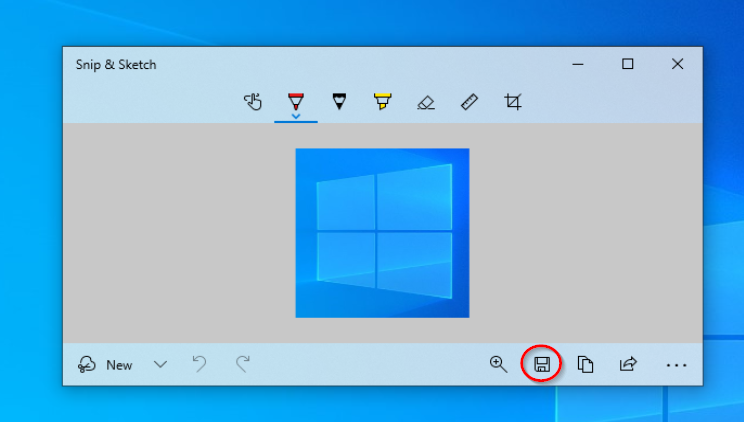
| | * '''Save the file to the Documents folder.''' |
| *Fill in the recipient’s email address, add a subject, type your message, and click 'Send'.
| | ** Click the Save icon in the Snipping Tool or Snip & Sketch window. <br> <br>[[File:Image save snip.png]]<br> |
| <p style="border: 0px solid rgb(227, 227, 227); box-sizing: border-box; --tw-border-spacing-x: 0; --tw-border-spacing-y: 0; --tw-translate-x: 0; --tw-translate-y: 0; --tw-rotate: 0; --tw-skew-x: 0; --tw-skew-y: 0; --tw-scale-x: 1; --tw-scale-y: 1; --tw-scroll-snap-strictness: proximity; --tw-ring-offset-width: 0px; --tw-ring-offset-color: #fff; --tw-ring-color: rgba(69,89,164,.5); --tw-ring-offset-shadow: 0 0 transparent; --tw-ring-shadow: 0 0 transparent; --tw-shadow: 0 0 transparent; --tw-shadow-colored: 0 0 transparent; margin: 1.25em 0px; color: rgb(236, 236, 236); font-family: Söhne, ui-sans-serif, system-ui, -apple-system, "Segoe UI", Roboto, Ubuntu, Cantarell, "Noto Sans", sans-serif, "Helvetica Neue", Arial, "Apple Color Emoji", "Segoe UI Emoji", "Segoe UI Symbol", "Noto Color Emoji"; font-size: 16px; font-style: normal; font-variant-ligatures: normal; font-variant-caps: normal; font-weight: 400; letter-spacing: normal; text-align: start; text-indent: 0px; text-transform: none; word-spacing: 0px; -webkit-text-stroke-width: 0px; white-space: pre-wrap; background-color: rgb(33, 33, 33); text-decoration-thickness: initial; text-decoration-style: initial; text-decoration-color: initial; --darkreader-inline-border-top: #383d3f; --darkreader-inline-border-right: #383d3f; --darkreader-inline-border-bottom: #383d3f; --darkreader-inline-border-left: #383d3f; --darkreader-inline-color: #dcd9d4; --darkreader-inline-bgcolor: #191b1c;" data-darkreader-inline-border-top="" data-darkreader-inline-border-right="" data-darkreader-inline-border-bottom="" data-darkreader-inline-border-left="" data-darkreader-inline-color="" data-darkreader-inline-bgcolor=""><strong style="border: 0px solid rgb(227, 227, 227); box-sizing: border-box; --tw-border-spacing-x: 0; --tw-border-spacing-y: 0; --tw-translate-x: 0; --tw-translate-y: 0; --tw-rotate: 0; --tw-skew-x: 0; --tw-skew-y: 0; --tw-scale-x: 1; --tw-scale-y: 1; --tw-scroll-snap-strictness: proximity; --tw-ring-offset-width: 0px; --tw-ring-offset-color: #fff; --tw-ring-color: rgba(69,89,164,.5); --tw-ring-offset-shadow: 0 0 transparent; --tw-ring-shadow: 0 0 transparent; --tw-shadow: 0 0 transparent; --tw-shadow-colored: 0 0 transparent; font-weight: 600; color: var(--tw-prose-bold); --darkreader-inline-border-top: #383d3f; --darkreader-inline-border-right: #383d3f; --darkreader-inline-border-bottom: #383d3f; --darkreader-inline-border-left: #383d3f; --darkreader-inline-color: var(--darkreader-text--tw-prose-bold);" data-darkreader-inline-border-top="" data-darkreader-inline-border-right="" data-darkreader-inline-border-bottom="" data-darkreader-inline-border-left="" data-darkreader-inline-color="">Step 9: Open Slack</strong></p>
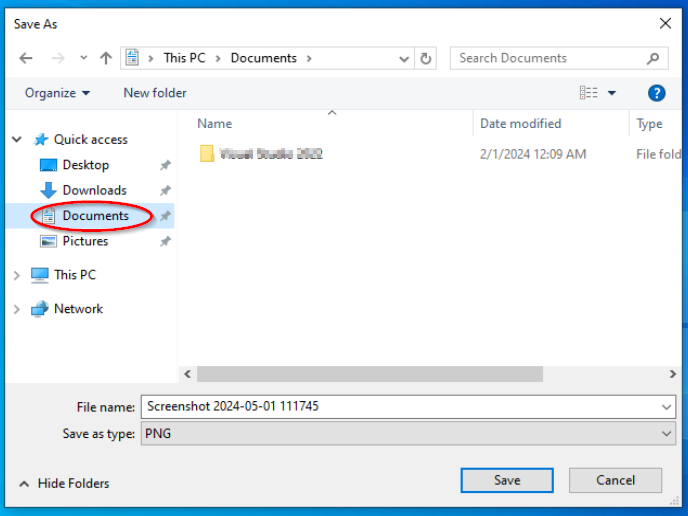
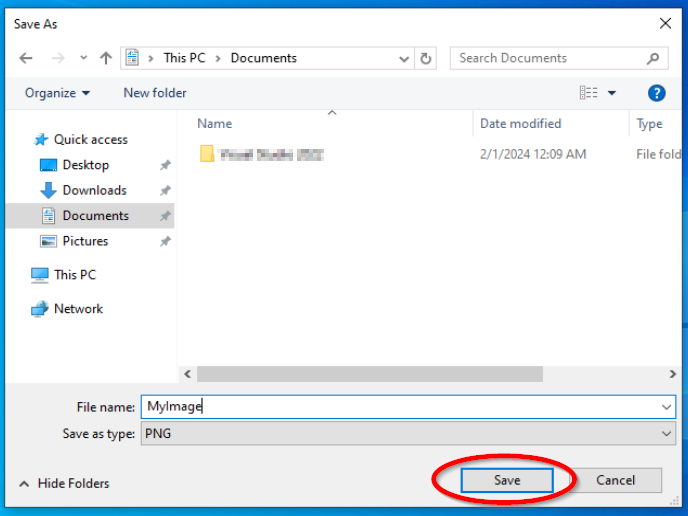
| | ** In the save dialog box that appears, navigate to the Documents folder: |
| *<strong style="border: 0px solid rgb(227, 227, 227); box-sizing: border-box; --tw-border-spacing-x: 0; --tw-border-spacing-y: 0; --tw-translate-x: 0; --tw-translate-y: 0; --tw-rotate: 0; --tw-skew-x: 0; --tw-skew-y: 0; --tw-scale-x: 1; --tw-scale-y: 1; --tw-scroll-snap-strictness: proximity; --tw-ring-offset-width: 0px; --tw-ring-offset-color: #fff; --tw-ring-color: rgba(69,89,164,.5); --tw-ring-offset-shadow: 0 0 transparent; --tw-ring-shadow: 0 0 transparent; --tw-shadow: 0 0 transparent; --tw-shadow-colored: 0 0 transparent; font-weight: 600; color: var(--tw-prose-bold); margin-top: 1.25em; margin-bottom: 1.25em; --darkreader-inline-border-top: #383d3f; --darkreader-inline-border-right: #383d3f; --darkreader-inline-border-bottom: #383d3f; --darkreader-inline-border-left: #383d3f; --darkreader-inline-color: var(--darkreader-text--tw-prose-bold);" data-darkreader-inline-border-top="" data-darkreader-inline-border-right="" data-darkreader-inline-border-bottom="" data-darkreader-inline-border-left="" data-darkreader-inline-color="">Launch Slack.</strong>
| | *** On the left side of the save dialog box, click 'Documents'. <br> <br>[[File:Image save in documents.png]]<br> |
| *Open Slack and navigate to the channel or direct message where you want to send the file.
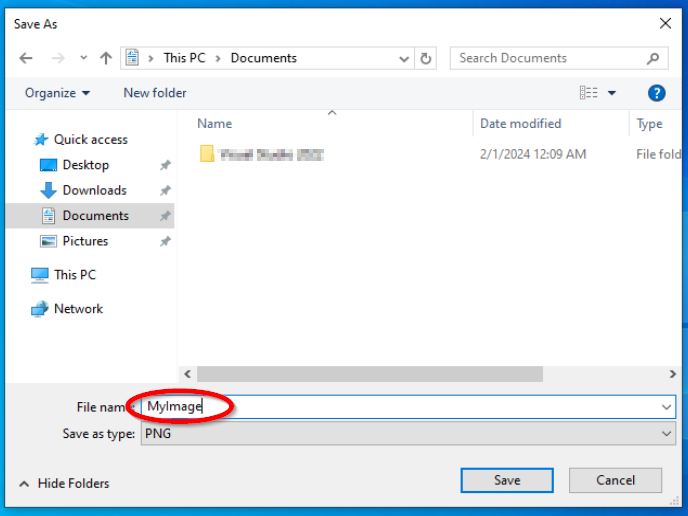
| | ** Type a name for your file in the 'File name' field. <br> <br>[[File:Image save image name.png]]<br> |
| <p style="border: 0px solid rgb(227, 227, 227); box-sizing: border-box; --tw-border-spacing-x: 0; --tw-border-spacing-y: 0; --tw-translate-x: 0; --tw-translate-y: 0; --tw-rotate: 0; --tw-skew-x: 0; --tw-skew-y: 0; --tw-scale-x: 1; --tw-scale-y: 1; --tw-scroll-snap-strictness: proximity; --tw-ring-offset-width: 0px; --tw-ring-offset-color: #fff; --tw-ring-color: rgba(69,89,164,.5); --tw-ring-offset-shadow: 0 0 transparent; --tw-ring-shadow: 0 0 transparent; --tw-shadow: 0 0 transparent; --tw-shadow-colored: 0 0 transparent; margin: 1.25em 0px; color: rgb(236, 236, 236); font-family: Söhne, ui-sans-serif, system-ui, -apple-system, "Segoe UI", Roboto, Ubuntu, Cantarell, "Noto Sans", sans-serif, "Helvetica Neue", Arial, "Apple Color Emoji", "Segoe UI Emoji", "Segoe UI Symbol", "Noto Color Emoji"; font-size: 16px; font-style: normal; font-variant-ligatures: normal; font-variant-caps: normal; font-weight: 400; letter-spacing: normal; text-align: start; text-indent: 0px; text-transform: none; word-spacing: 0px; -webkit-text-stroke-width: 0px; white-space: pre-wrap; background-color: rgb(33, 33, 33); text-decoration-thickness: initial; text-decoration-style: initial; text-decoration-color: initial; --darkreader-inline-border-top: #383d3f; --darkreader-inline-border-right: #383d3f; --darkreader-inline-border-bottom: #383d3f; --darkreader-inline-border-left: #383d3f; --darkreader-inline-color: #dcd9d4; --darkreader-inline-bgcolor: #191b1c;" data-darkreader-inline-border-top="" data-darkreader-inline-border-right="" data-darkreader-inline-border-bottom="" data-darkreader-inline-border-left="" data-darkreader-inline-color="" data-darkreader-inline-bgcolor=""><strong style="border: 0px solid rgb(227, 227, 227); box-sizing: border-box; --tw-border-spacing-x: 0; --tw-border-spacing-y: 0; --tw-translate-x: 0; --tw-translate-y: 0; --tw-rotate: 0; --tw-skew-x: 0; --tw-skew-y: 0; --tw-scale-x: 1; --tw-scale-y: 1; --tw-scroll-snap-strictness: proximity; --tw-ring-offset-width: 0px; --tw-ring-offset-color: #fff; --tw-ring-color: rgba(69,89,164,.5); --tw-ring-offset-shadow: 0 0 transparent; --tw-ring-shadow: 0 0 transparent; --tw-shadow: 0 0 transparent; --tw-shadow-colored: 0 0 transparent; font-weight: 600; color: var(--tw-prose-bold); --darkreader-inline-border-top: #383d3f; --darkreader-inline-border-right: #383d3f; --darkreader-inline-border-bottom: #383d3f; --darkreader-inline-border-left: #383d3f; --darkreader-inline-color: var(--darkreader-text--tw-prose-bold);" data-darkreader-inline-border-top="" data-darkreader-inline-border-right="" data-darkreader-inline-border-bottom="" data-darkreader-inline-border-left="" data-darkreader-inline-color="">Step 10: Attach the File in Slack</strong></p>
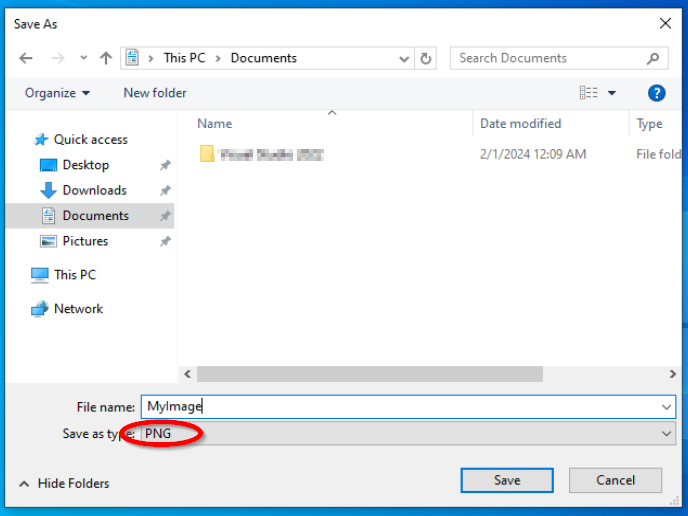
| | ** Choose a file format, like JPEG or PNG, from the 'Save as type' dropdown menu. <br> <br>[[File:Image save as type.png]]<br> |
| *<strong style="border: 0px solid rgb(227, 227, 227); box-sizing: border-box; --tw-border-spacing-x: 0; --tw-border-spacing-y: 0; --tw-translate-x: 0; --tw-translate-y: 0; --tw-rotate: 0; --tw-skew-x: 0; --tw-skew-y: 0; --tw-scale-x: 1; --tw-scale-y: 1; --tw-scroll-snap-strictness: proximity; --tw-ring-offset-width: 0px; --tw-ring-offset-color: #fff; --tw-ring-color: rgba(69,89,164,.5); --tw-ring-offset-shadow: 0 0 transparent; --tw-ring-shadow: 0 0 transparent; --tw-shadow: 0 0 transparent; --tw-shadow-colored: 0 0 transparent; font-weight: 600; color: var(--tw-prose-bold); margin-top: 1.25em; margin-bottom: 1.25em; --darkreader-inline-border-top: #383d3f; --darkreader-inline-border-right: #383d3f; --darkreader-inline-border-bottom: #383d3f; --darkreader-inline-border-left: #383d3f; --darkreader-inline-color: var(--darkreader-text--tw-prose-bold);" data-darkreader-inline-border-top="" data-darkreader-inline-border-right="" data-darkreader-inline-border-bottom="" data-darkreader-inline-border-left="" data-darkreader-inline-color="">Attach the file to your message.</strong>
| | ** Click 'Save' to save your screenshot or snippet to the Documents folder. <br> <br>[[File:Image save image.png]]<br> |
| *Click on the attachment icon (+), choose “Upload a File,” select your file, and click 'Open'.
| | ** You can now [[Send Documents From Gmail|send this image via Gmail]], or [[Send Documents From Slack|send this image via Slack]]. |
| <p style="border: 0px solid rgb(227, 227, 227); box-sizing: border-box; --tw-border-spacing-x: 0; --tw-border-spacing-y: 0; --tw-translate-x: 0; --tw-translate-y: 0; --tw-rotate: 0; --tw-skew-x: 0; --tw-skew-y: 0; --tw-scale-x: 1; --tw-scale-y: 1; --tw-scroll-snap-strictness: proximity; --tw-ring-offset-width: 0px; --tw-ring-offset-color: #fff; --tw-ring-color: rgba(69,89,164,.5); --tw-ring-offset-shadow: 0 0 transparent; --tw-ring-shadow: 0 0 transparent; --tw-shadow: 0 0 transparent; --tw-shadow-colored: 0 0 transparent; margin: 1.25em 0px; color: rgb(236, 236, 236); font-family: Söhne, ui-sans-serif, system-ui, -apple-system, "Segoe UI", Roboto, Ubuntu, Cantarell, "Noto Sans", sans-serif, "Helvetica Neue", Arial, "Apple Color Emoji", "Segoe UI Emoji", "Segoe UI Symbol", "Noto Color Emoji"; font-size: 16px; font-style: normal; font-variant-ligatures: normal; font-variant-caps: normal; font-weight: 400; letter-spacing: normal; text-align: start; text-indent: 0px; text-transform: none; word-spacing: 0px; -webkit-text-stroke-width: 0px; white-space: pre-wrap; background-color: rgb(33, 33, 33); text-decoration-thickness: initial; text-decoration-style: initial; text-decoration-color: initial; --darkreader-inline-border-top: #383d3f; --darkreader-inline-border-right: #383d3f; --darkreader-inline-border-bottom: #383d3f; --darkreader-inline-border-left: #383d3f; --darkreader-inline-color: #dcd9d4; --darkreader-inline-bgcolor: #191b1c;" data-darkreader-inline-border-top="" data-darkreader-inline-border-right="" data-darkreader-inline-border-bottom="" data-darkreader-inline-border-left="" data-darkreader-inline-color="" data-darkreader-inline-bgcolor=""><strong style="border: 0px solid rgb(227, 227, 227); box-sizing: border-box; --tw-border-spacing-x: 0; --tw-border-spacing-y: 0; --tw-translate-x: 0; --tw-translate-y: 0; --tw-rotate: 0; --tw-skew-x: 0; --tw-skew-y: 0; --tw-scale-x: 1; --tw-scale-y: 1; --tw-scroll-snap-strictness: proximity; --tw-ring-offset-width: 0px; --tw-ring-offset-color: #fff; --tw-ring-color: rgba(69,89,164,.5); --tw-ring-offset-shadow: 0 0 transparent; --tw-ring-shadow: 0 0 transparent; --tw-shadow: 0 0 transparent; --tw-shadow-colored: 0 0 transparent; font-weight: 600; color: var(--tw-prose-bold); --darkreader-inline-border-top: #383d3f; --darkreader-inline-border-right: #383d3f; --darkreader-inline-border-bottom: #383d3f; --darkreader-inline-border-left: #383d3f; --darkreader-inline-color: var(--darkreader-text--tw-prose-bold);" data-darkreader-inline-border-top="" data-darkreader-inline-border-right="" data-darkreader-inline-border-bottom="" data-darkreader-inline-border-left="" data-darkreader-inline-color="">Step 11: Send the File in Slack</strong></p>
| | |
| *<strong style="border: 0px solid rgb(227, 227, 227); box-sizing: border-box; --tw-border-spacing-x: 0; --tw-border-spacing-y: 0; --tw-translate-x: 0; --tw-translate-y: 0; --tw-rotate: 0; --tw-skew-x: 0; --tw-skew-y: 0; --tw-scale-x: 1; --tw-scale-y: 1; --tw-scroll-snap-strictness: proximity; --tw-ring-offset-width: 0px; --tw-ring-offset-color: #fff; --tw-ring-color: rgba(69,89,164,.5); --tw-ring-offset-shadow: 0 0 transparent; --tw-ring-shadow: 0 0 transparent; --tw-shadow: 0 0 transparent; --tw-shadow-colored: 0 0 transparent; font-weight: 600; color: var(--tw-prose-bold); margin-top: 1.25em; margin-bottom: 1.25em; --darkreader-inline-border-top: #383d3f; --darkreader-inline-border-right: #383d3f; --darkreader-inline-border-bottom: #383d3f; --darkreader-inline-border-left: #383d3f; --darkreader-inline-color: var(--darkreader-text--tw-prose-bold);" data-darkreader-inline-border-top="" data-darkreader-inline-border-right="" data-darkreader-inline-border-bottom="" data-darkreader-inline-border-left="" data-darkreader-inline-color="">Send the message.</strong>
| | |
| *Type any accompanying message, then press 'Enter' or click 'Send' to share the screenshot or snippet.
| | |
| <hr style="border-width: 1px 0px 0px; border-style: solid; border-color: var(--tw-prose-hr); border-image: initial; box-sizing: border-box; --tw-border-spacing-x: 0; --tw-border-spacing-y: 0; --tw-translate-x: 0; --tw-translate-y: 0; --tw-rotate: 0; --tw-skew-x: 0; --tw-skew-y: 0; --tw-scale-x: 1; --tw-scale-y: 1; --tw-scroll-snap-strictness: proximity; --tw-ring-offset-width: 0px; --tw-ring-offset-color: #fff; --tw-ring-color: rgba(69,89,164,.5); --tw-ring-offset-shadow: 0 0 transparent; --tw-ring-shadow: 0 0 transparent; --tw-shadow: 0 0 transparent; --tw-shadow-colored: 0 0 transparent; color: rgb(236, 236, 236); height: 0px; margin: 3em 0px; font-family: Söhne, ui-sans-serif, system-ui, -apple-system, "Segoe UI", Roboto, Ubuntu, Cantarell, "Noto Sans", sans-serif, "Helvetica Neue", Arial, "Apple Color Emoji", "Segoe UI Emoji", "Segoe UI Symbol", "Noto Color Emoji"; font-size: 16px; font-style: normal; font-variant-ligatures: normal; font-variant-caps: normal; font-weight: 400; letter-spacing: normal; text-align: start; text-indent: 0px; text-transform: none; word-spacing: 0px; -webkit-text-stroke-width: 0px; white-space: pre-wrap; background-color: rgb(33, 33, 33); text-decoration-thickness: initial; text-decoration-style: initial; text-decoration-color: initial; --darkreader-inline-color: #dcd9d4; --darkreader-inline-bgcolor: #191b1c; --darkreader-inline-border: var(--darkreader-border--tw-prose-hr);" data-darkreader-inline-color="" data-darkreader-inline-bgcolor="" data-darkreader-inline-border=""><p style="border: 0px solid rgb(227, 227, 227); box-sizing: border-box; --tw-border-spacing-x: 0; --tw-border-spacing-y: 0; --tw-translate-x: 0; --tw-translate-y: 0; --tw-rotate: 0; --tw-skew-x: 0; --tw-skew-y: 0; --tw-scale-x: 1; --tw-scale-y: 1; --tw-scroll-snap-strictness: proximity; --tw-ring-offset-width: 0px; --tw-ring-offset-color: #fff; --tw-ring-color: rgba(69,89,164,.5); --tw-ring-offset-shadow: 0 0 transparent; --tw-ring-shadow: 0 0 transparent; --tw-shadow: 0 0 transparent; --tw-shadow-colored: 0 0 transparent; margin: 0px 0px 1.25em; color: rgb(236, 236, 236); font-family: Söhne, ui-sans-serif, system-ui, -apple-system, "Segoe UI", Roboto, Ubuntu, Cantarell, "Noto Sans", sans-serif, "Helvetica Neue", Arial, "Apple Color Emoji", "Segoe UI Emoji", "Segoe UI Symbol", "Noto Color Emoji"; font-size: 16px; font-style: normal; font-variant-ligatures: normal; font-variant-caps: normal; font-weight: 400; letter-spacing: normal; text-align: start; text-indent: 0px; text-transform: none; word-spacing: 0px; -webkit-text-stroke-width: 0px; white-space: pre-wrap; background-color: rgb(33, 33, 33); text-decoration-thickness: initial; text-decoration-style: initial; text-decoration-color: initial; --darkreader-inline-border-top: #383d3f; --darkreader-inline-border-right: #383d3f; --darkreader-inline-border-bottom: #383d3f; --darkreader-inline-border-left: #383d3f; --darkreader-inline-color: #dcd9d4; --darkreader-inline-bgcolor: #191b1c;" data-darkreader-inline-border-top="" data-darkreader-inline-border-right="" data-darkreader-inline-border-bottom="" data-darkreader-inline-border-left="" data-darkreader-inline-color="" data-darkreader-inline-bgcolor=""><strong style="border: 0px solid rgb(227, 227, 227); box-sizing: border-box; --tw-border-spacing-x: 0; --tw-border-spacing-y: 0; --tw-translate-x: 0; --tw-translate-y: 0; --tw-rotate: 0; --tw-skew-x: 0; --tw-skew-y: 0; --tw-scale-x: 1; --tw-scale-y: 1; --tw-scroll-snap-strictness: proximity; --tw-ring-offset-width: 0px; --tw-ring-offset-color: #fff; --tw-ring-color: rgba(69,89,164,.5); --tw-ring-offset-shadow: 0 0 transparent; --tw-ring-shadow: 0 0 transparent; --tw-shadow: 0 0 transparent; --tw-shadow-colored: 0 0 transparent; font-weight: 600; color: var(--tw-prose-bold); --darkreader-inline-border-top: #383d3f; --darkreader-inline-border-right: #383d3f; --darkreader-inline-border-bottom: #383d3f; --darkreader-inline-border-left: #383d3f; --darkreader-inline-color: var(--darkreader-text--tw-prose-bold);" data-darkreader-inline-border-top="" data-darkreader-inline-border-right="" data-darkreader-inline-border-bottom="" data-darkreader-inline-border-left="" data-darkreader-inline-color="">Why Take Screenshots or Snippets?</strong> These tools are invaluable for effectively communicating visual information, demonstrating processes, or clarifying issues, making them essential in many professional settings.</p>
| | |
| | |
| | |
| | ''If any information is incorrect or out-of-date, please notify the Technical Support team at [mailto:workfromhome@imkgp.com workfromhome@imkgp.com].'' |